 Taalk Help Center
Create an AI Agent
Build a new agent in five steps: describe it or pick a template, then review each part before you create it.
Go to Outreach › AI Agents › Agents and click + New.
The wizard has five steps: Start, Basics, Conversation, Call handling and Review. The step bar at the top lets you jump back to any step you've finished.
Step 1: Start
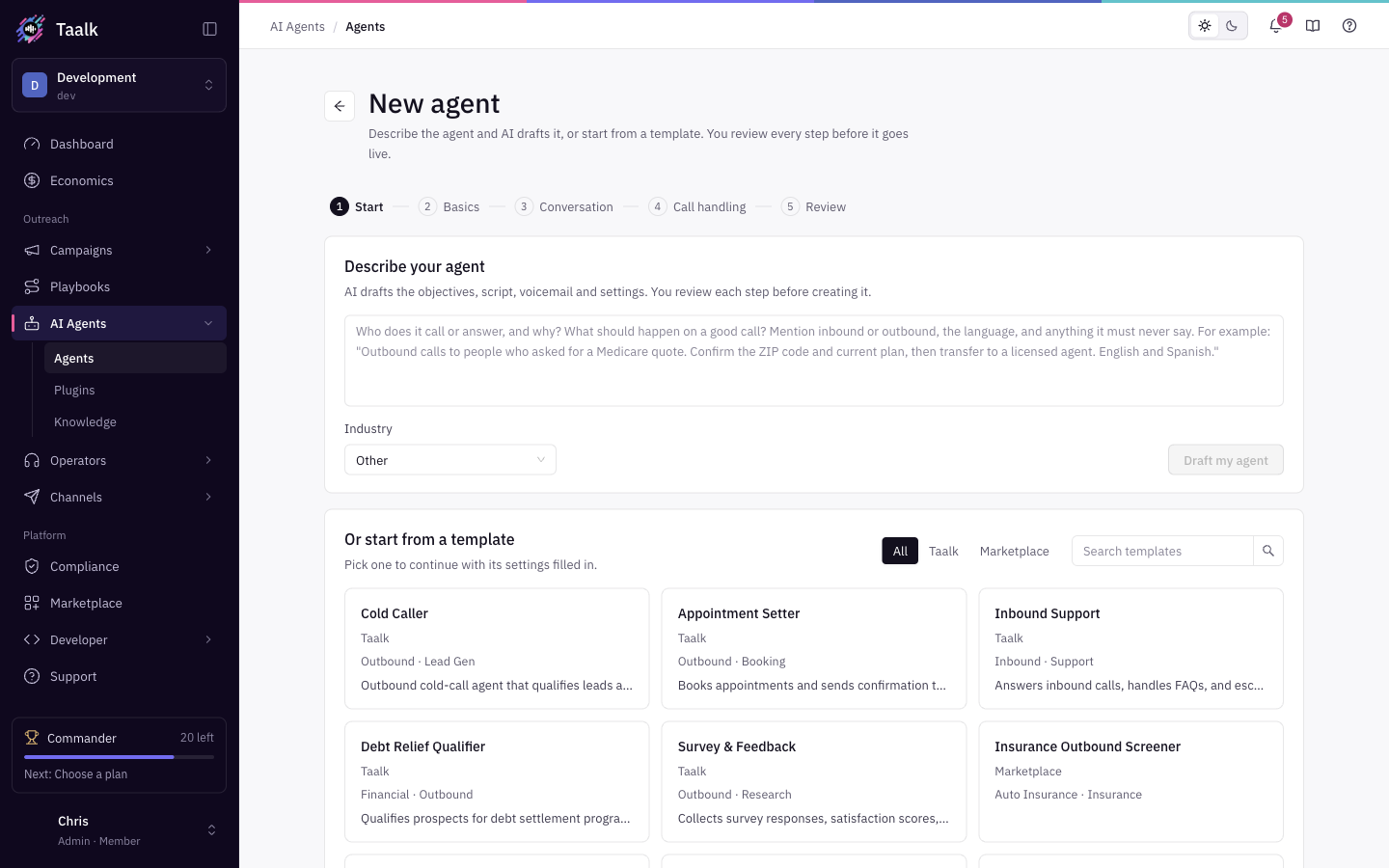 Pick one of three ways to begin.
Describe your agent (AI draft)
- In Describe your agent, write who the agent calls or answers and why, what a good call looks like, inbound or outbound, the language, and anything it must never say. Write at least 20 characters (up to 2,000).
- Pick an Industry. It's pre-filled from your sign-up answers.
- Click Draft my agent. AI drafts the objectives, script, voicemail and settings, then takes you to Basics with everything filled in. A note explains what was drafted.
Draft my agent needs the Taalk AI Builder add-on, which is free. If it isn't on your workspace yet, Taalk opens it in the Marketplace so you can add it. See Taalk AI Builder.
If you see No agent was drafted. Add a little more detail and try again., add more detail to your description.
Or start from a template
Use All / Taalk / Marketplace and Search templates to find one.
Taalk templates fill in the settings and take you to Basics:
| Template | Objectives | Who Speaks First? | Post-call webhook sends |
|---|---|---|---|
| Cold Caller | Qualify leads, transfer to a live rep | AI Speaks First | Only with Call Actions |
| Appointment Setter | Book an appointment, text a confirmation link | AI Speaks First | Send When Answered by Human |
| Inbound Support | Answer from your knowledge, escalate when needed | Wait on Inbound Only | Send When Answered by Human |
| Debt Relief Qualifier | Qualify for debt settlement, transfer to a specialist | AI Speaks First | Only with Call Actions |
| Survey & Feedback | Ask a short series of questions, thank the participant | AI Speaks First | Send When Answered by Human |
A Taalk template only writes the Objectives text and these settings. You still write the Script and logic, pick a voice and add a transfer number. Replace {company} in the objectives with your company name.
Marketplace templates are agents shared by Taalk and creators. Clicking one opens its Marketplace page, where you install it. Browse all in Marketplace opens the full list in a new tab. See Marketplace Templates.
Start blank instead
Click Start blank instead to begin with default settings.
Step 2: Basics
- Identity: Agent ID (required), Agent Name, Group, Memo, Tags. See Agent Identity.
- Voice and behavior: voice, language and conversation settings. See Voice and Persona and Agent Behaviors.
Step 3: Conversation
- Objectives and script (Objectives is required). See Objectives and Scripts.
- Knowledge and skills. See Agent Knowledge.
Step 4: Call handling
- Call transfer. See Transfers and Call Flow.
- Voicemail and messaging. See Voicemail.
- Post-call automation. See Event Webhooks.
Click Continue to … to move on, or Back to go back. If a required field is empty you see Complete the required fields before continuing.
Step 5: Review
Check the essentials: name, agent name, voice, language, objectives, script, knowledge and plugins, transfer number, voicemail and webhook. Click Edit on a row to go back to that step.
Click Create agent. The agent page opens with the Test call dialog ready, so you can hear your agent right away. See Test Your Agent.
After you create it
- Finish the readiness checks on the agent page before you use it in a live campaign. See AI Agents Overview.
- You can change anything later on the agent page.
What the wizard can't do (yet)
- A Marketplace template can't be applied inside the wizard. It opens the Marketplace page instead.
- Taalk templates don't write a script or pick a voice.