 Taalk Help Center
Voice and Persona
Pick how your agent sounds: the voice, its fine-tuning, and the name callers hear. You can also bring your own voices with the Custom Voices add-on.
Go to Outreach › AI Agents › Agents, open an agent, and click Voice and behavior under Configuration.
Pick a voice
- Open the Voice list.
- Pick a voice. Each name is tagged with its accent or language.
| Tag | Voices |
|---|---|
| (US) | Hanna, Athena, Stella, Trinity, Kisha, Hope, Sally, Jessica, Eric, Jake, Kyle, Dinoj, Micha, Monica, Mark ConvoAI, Lauren ConvoAI, Odysseus, Thalia |
| (GB) / (UK) | Cathy, Draco, Pandora |
| (Spanish) | Maria, Lisa, Andrea, Jorge, Juan, Luis, David, Arthis, Memo, Maico, Felipe, Marcela, Aquila, Selena, Sirio, Estrella |
| (Custom) | Your own voices, with the Custom Voices add-on (below) |
- Click Save in the row.
There's no preview button in the list. To hear a voice, save it and click Roleplay. See Test Your Agent.
Default is at the top of the list, but the readiness check Voice selected only passes when you pick a named voice.
Pick a voice that matches the agent's Language: a (Spanish) voice for Spanish agents. Taalk doesn't filter the list by language. See Multi-Language Agents.
Voice Tuning
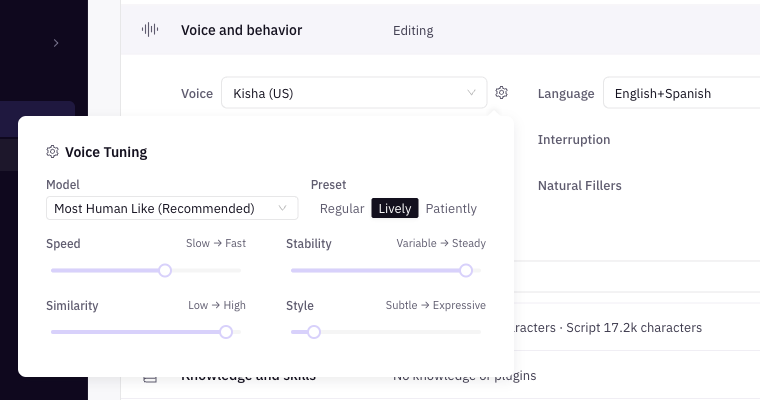 Click the gear next to Voice to open Voice Tuning.
| Setting | Options | Default | What it does |
|---|---|---|---|
| Model | Default, Fastest but less human like, Most Human Like (Recommended), Eleven Flash V2.5, Eleven Flash V2 | Default | The speech model. Faster models answer sooner; more human models sound more natural. |
| Preset | Regular, Lively, Patiently | Regular | Sets the four sliders below in one click. |
| Speed | 0.7 to 1.2 | 1 | How fast the agent talks. |
| Stability | 0 to 1 (Variable → Steady) | 0.95 | Low values vary the delivery more; high values keep it even. |
| Similarity | 0 to 1 (Low → High) | 0.95 | How closely the voice sticks to the original voice. |
| Style | 0 to 1 (Subtle → Expressive) | 0.05 | How much expression the agent adds. |
What each preset sets:
| Preset | Speed | Stability | Similarity | Style |
|---|---|---|---|---|
| Regular | 1 | 0.95 | 0.95 | 0.05 |
| Lively | 1 | 0.8 | 0.8 | 0.15 |
| Patiently | 0.9 | 0.95 | 0.95 | 0.05 |
[Confirm] Model, Stability, Similarity and Style only affect ElevenLabs voices, not the Deepgram voices (Odysseus, Thalia, Draco, Pandora, Aquila, Selena, Sirio, Estrella).
Tip: change one setting at a time and run a Roleplay after each change.
Agent Name (the persona callers hear)
The name callers hear is Agent Name in the Identity section. If it's blank when you pick a voice, Taalk fills it in from the voice ("Hanna" for Hanna (US)). Say it in your script with {agentName}. See Agent Identity.
The agent's personality, role and tone come from Objectives, not from the voice. See Objectives and Scripts.
Custom Voices add-on
Use your own ElevenLabs, Deepgram or PlayHT voice IDs. The add-on costs $5.00 a month. See Marketplace and Add-ons.
- Add Custom Voices from the Marketplace.
- Open the workspace menu, then Manage workspaces › your workspace › Company Detail.
- In Custom Voices, click Add a custom voice.
- Fill in:
- Display Name: how the voice shows in the Voice list.
- Voice ID: the ID from your provider.
- Provider: ElevenLabs, Deepgram or PlayHT.
- Save.
Your voice shows in every agent's Voice list as "Display Name (Custom)". Use Remove to take one off the list.
If you cancel the add-on, your custom voices stay saved but are greyed out in the Voice list until you add it again. The Custom Voices panel only shows while the add-on is active.
What voices can't do (yet)
- No gender, accent or age filters, and no preview button in the list.
- Voice settings aren't copied when you save to an agent group, so each agent in a group keeps its own voice. See Agent Groups.