 Taalk Help Center
Voicemail: Scripts, Detection and Voicemail-Only Mode
When a call reaches an answering machine, your AI agent can leave a short message or hang up. This article covers the agent's voicemail settings, the campaign settings that affect voicemail, and how voicemail is billed.
Go to Outreach › AI Agents › Agents, open an agent, then click Edit on Configuration › Voicemail and messaging.
Write a voicemail script
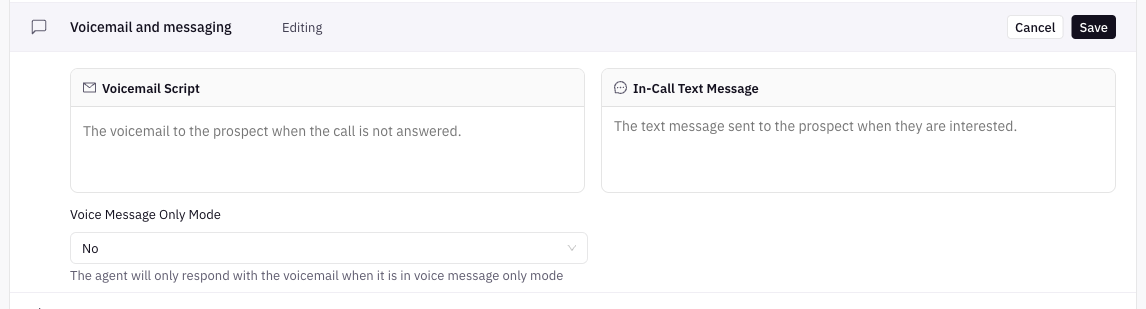
- In Voicemail Script, write the message the agent leaves.
- Use variables to personalize it, such as
{name},{agentName}or any{Taalk_…}field. - Click Save.
| Rule | Detail |
|---|---|
| Blank = no voicemail | If Voicemail Script is empty, the agent leaves no message. |
| Length | Up to 500 characters |
| Variables | Same as the script. See Script Variables and Formatting. |
The voicemail is a separate field, not part of Objectives or Script and logic.
Example:
Hi {name}, this is {agentName} with Acme Insurance, following up on the quote you requested. Please call us back at 555-010-0000. Again, 555-010-0000. Thanks.
Tips for a good voicemail
- Say who you are and why you're calling in the first sentence.
- Keep it to about 20 seconds.
- Give a clear next step and repeat the callback number.
- For collections, don't mention the debt. Check the wording with your counsel.
Voice Message Only Mode
Under the two fields, Voice Message Only Mode (Yes / No) makes the agent only deliver the voicemail. It doesn't hold a conversation.
[Confirm] Whether Voice Message Only Mode also plays the voicemail when a person answers.
How voicemail is detected
Taalk checks each answered outbound call for an answering machine. If it finds one, the agent leaves the Voicemail Script (or hangs up if it's blank) and the call is logged as an answering machine.
[Confirm] (C13) Detection mechanics: how long detection takes, whether the agent waits for the beep, and what happens when detection is unsure.
Always Transfer
Call transfer › Always Transfer forces the transfer even if voicemail or no one is detected on the line. Use it when your own phone system handles detection. With it on, expect fewer voicemails left by the agent.
[Confirm] Whether a voicemail is left on calls that Always Transfer sends to your target.
Campaign settings that affect voicemail
Open the campaign at Outreach › Campaigns › Campaigns, then Settings.
| Setting | Where | What it does |
|---|---|---|
| Voicemail Cooldown | Engagement strategy | Minimum time between voicemails to the same contact. Always (default) leaves one whenever a call reaches voicemail. Other choices run from 1 Day to 6 Months. |
| Double-Dial (Bypass DND) | Engagement strategy | No Bypass - Call Normally (default), Bypass DND (No Voicemail) or Bypass DND (With Voicemail). Dials twice in quick succession to get past Do Not Disturb on mobile phones. Use responsibly. |
| Ring Timeout | Outbound setup | Seconds to ring before hanging up. 20 to 25 seconds is standard. 12 to 15 seconds avoids most voicemail boxes. Shorter timeouts may draw carrier scrutiny. |
Retries, stop conditions and cooldowns are covered in Retry and stop rules.
Inbound numbers
Phone numbers have their own Voicemail Message in the number's Advanced section (Outreach › Channels › Phone numbers, open the number), up to 500 characters: "Message to leave when not available".
[Confirm] When the phone number's Voicemail Message plays and how it relates to the agent's Voicemail Script.
See which calls hit voicemail
- Call log: the Answering machine tab lists calls that reached a machine. Calls where the agent left a message show AMD and Voicemail Left. See The Call Log.
- Campaign › Contacts: the Answering machine tab lists contacts reached by an answering machine. The contact's timeline shows Voicemail left or Answering machine per call.
- Mobile app: the call list has a Voicemail filter.
What voicemail costs
A call that reaches an answering machine is charged the connect fee only. It reflects the carrier cost of the connection. Leaving a voicemail costs nothing extra. See How Billing Works.
What voicemail can't do (yet)
- There are no detection settings to tune (timeouts or sensitivity).
- There's no separate "drop" switch. Leave Voicemail Script blank to hang up without a message.
- The agent doesn't send a text after leaving a voicemail. Use a playbook for follow-up texts.
Troubleshooting
| Problem | Fix |
|---|---|
| No voicemails are left | Voicemail Script is blank, Voicemail Cooldown hasn't passed for that contact, or Always Transfer is on. |
| The message is cut off | Shorten it. The limit is 500 characters, and a shorter message is more likely to play in full. |
| A variable is read out as text | The field name doesn't match the uploaded column. |
| Too many calls reach voicemail | Try a Ring Timeout of 12 to 15 seconds, and check your caller IDs' health. |