 Taalk Help Center
Engagement Strategy: Outreach Modes
Outreach Mode decides how a campaign reaches contacts: by AI voice calls, by a multi-step playbook with calls, texts and email, or by email only. Each mode shows different fields.
Go to Outreach › Campaigns › Campaigns, open a campaign, then Settings › Engagement strategy › Edit.
Pick a mode
- Open Outreach Mode and choose Voice-Only, Multi-Channel or Email-Only.
- Fill in the fields that appear (tables below).
- Click Save.
Changing the mode clears the selected playbook, so pick it again after you switch.
| Mode | What it does | Pick it when |
|---|---|---|
| Voice-Only | Your AI agent calls each contact and retries on your schedule. | Phone conversations or live transfers are the goal. |
| Multi-Channel | A playbook runs a sequence of calls, texts and emails per contact. | You want texts or emails alongside calls, or a follow-up sequence over several days. |
| Email-Only | An email playbook sends emails. No calls or texts. | You only have consent for email, or want an email-only touch. |
Voice-Only fields
| Field | What it does |
|---|---|
| Max Retries | Most attempts per contact. 0 means no limit until a stop condition is met. Default 8. |
| Retry Interval | Time between attempts to the same contact: 2 to 48 hours. Default 4 hours. |
The AI agent and caller ID for Voice-Only are set in Outbound setup (Outbound AI Agents, Caller ID Number).
Multi-Channel fields
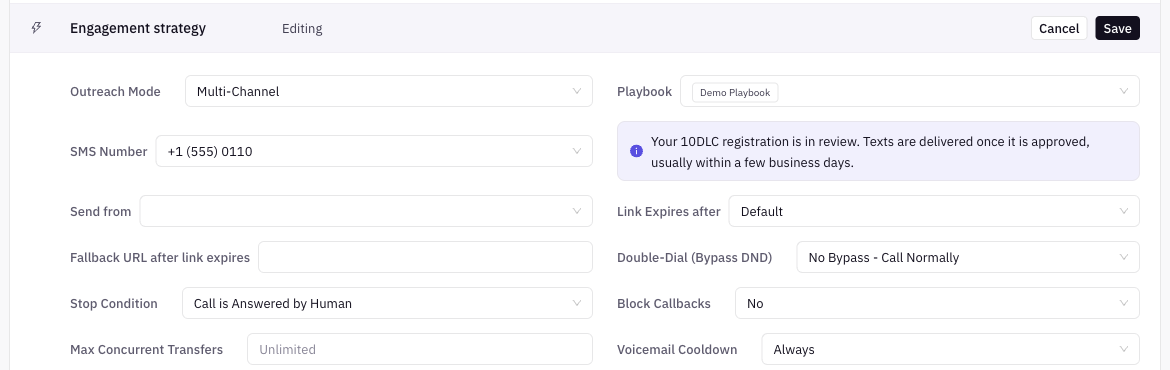
| Field | What it does |
|---|---|
| Playbook | The playbook that runs for each contact. Required. |
| SMS Number | The number texts are sent from. Required. |
| Send from | The email sender, if your workspace has email sending set up. |
| Link Expires after | How long tracked links in messages stay active: Default or 1 to 61 days. |
| Fallback URL after link expires | Where an expired link sends people. |
A texting compliance notice appears under SMS Number. Texts need a registered number. See 10DLC Registration.
Email-Only fields
| Field | What it does |
|---|---|
| Email Playbook | The email playbook to run. Required. |
| Send from Domains | Your email provider. Required. See Email Provider Setup. |
| Link Expires after | Same as Multi-Channel. |
| Fallback URL after link expires | Same as Multi-Channel. |
Fields in every mode
These show below the mode fields whichever mode you pick: Double-Dial (Bypass DND), Stop Condition, Block Callbacks, Max Concurrent Transfers and Voicemail Cooldown. See Retries, Double-Dial and Stop Conditions and Dial Pace, Ring Timeout and Transfer Capacity.
What each mode needs before launch
The campaign header won't let you launch until these pass.
| Mode | Required |
|---|---|
| All | Campaign name, valid calling hours, an Outreach Mode |
| Voice-Only | Caller ID Number and Outbound AI Agents |
| Multi-Channel | Playbook and SMS Number |
| Email-Only | Email Playbook and Send from Domains |
How mode changes the rest of Settings
| Setting in Outbound setup | Voice-Only | Multi-Channel | Email-Only |
|---|---|---|---|
| Dials per Hour, TCPA Calling Hours | Yes | Yes | Yes |
| Ring Timeout, DNC Detection, IVR Navigator | Yes | Yes | Hidden |
| Caller ID Number, Inbound Call Agent, Breaktime Agent, AfterHour Agent | Yes | Yes | Hidden |
| Outbound AI Agents | Yes | Hidden (the playbook decides) | Hidden |
What Outreach Mode can't do (yet)
- One campaign uses one mode. To call some contacts and only email others, make two campaigns.
- Multi-Channel and Email-Only list only playbooks of the matching type in the playbook picker.