 Taalk Help Center
Retries, Double-Dial and Stop Conditions
These settings control how often a campaign tries each contact and when it stops. Most of them are in the Engagement strategy section.
Go to Outreach › Campaigns › Campaigns, open a campaign, then Settings › Engagement strategy › Edit.
Retries
Shown when Outreach Mode is Voice-Only. For Multi-Channel and Email-Only, the playbook sets the timing of each step.
| Field | Options | Default | What it does |
|---|---|---|---|
| Max Retries | 0 to 99 | 8 | Most attempts per contact. 0 means no limit: the contact is tried until a stop condition is met. |
| Retry Interval | 2, 4, 6, 8, 12, 24 or 48 hours | 4 hours | Minimum wait between attempts to the same contact. |
Example from the app: 15 retries at a 4-hour interval is about 3 calls a day for about 5 days.
Retries only happen inside your schedule. If the interval ends outside your calling hours, the next attempt waits for the next window. See Campaign Scheduling.
Double-Dial (Bypass DND)
Calls twice in quick succession to get through Do-Not-Disturb on mobile phones. Use it responsibly and in line with your compliance rules.
| Option | What it does |
|---|---|
| No Bypass - Call Normally (default) | One call per attempt. |
| Bypass DND (No Voicemail) | Double-dials, without leaving a voicemail. |
| Bypass DND (With Voicemail) | Double-dials, and may leave a voicemail. |
[Confirm] How the two Bypass DND options decide whether a voicemail is left.
Stop Condition
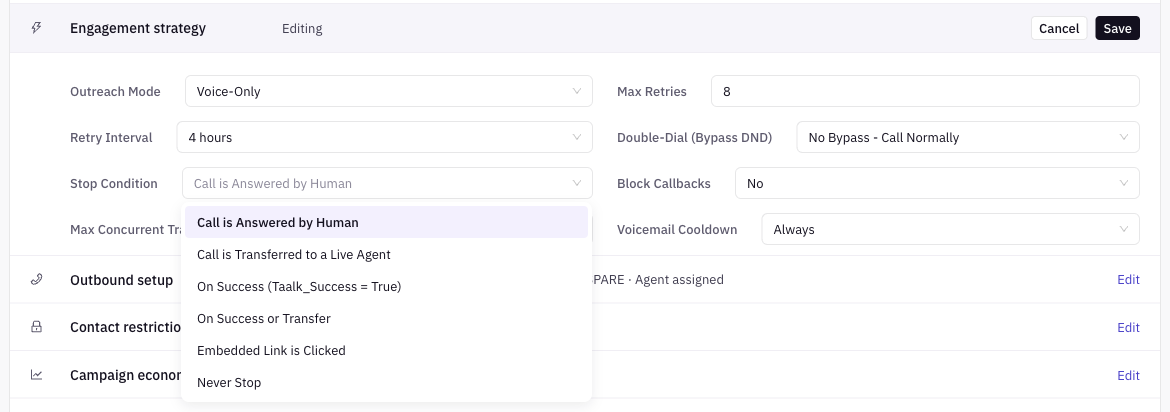 Stop contacting a contact once this condition is met. A contact that meets it is not dialed again in this campaign, even if retries remain.
| Option | The contact stops when |
|---|---|
| Call is Answered by Human (default) | A person answers. Voicemail and answering machines don't count. |
| Call is Transferred to a Live Agent | The AI agent transfers the call to a person. |
| On Success (Taalk_Success = True) | The contact's Taalk_Success value is true (set by your script or a plugin). |
| On Success or Transfer | Either of the two above. |
| Embedded Link is Clicked | The contact clicks a tracked link from a text or email. |
| Never Stop | Never. The contact is tried until Max Retries runs out. |
Contacts who opt out or are flagged Do-Not-Call stop no matter which option you pick.
[Confirm] When each stop condition is recorded during or after the call, for example whether a transfer counts once it starts or once a person answers (C10).
Pick a stop condition
| Your goal | Use |
|---|---|
| Live transfer to your team | Call is Transferred to a Live Agent |
| Appointment booked or data captured | On Success (Taalk_Success = True) |
| Either a transfer or a booked result | On Success or Transfer |
| Reach a person once (reminder, notice) | Call is Answered by Human |
| Get a click on a link | Embedded Link is Clicked |
Call is Answered by Human stops after the first person answers, even if the call didn't lead to a transfer. If you want to keep calling until a transfer, choose the transfer option.
Block Callbacks
Yes blocks return calls to this campaign's number. Use it when you don't want people calling back the campaign caller ID. Default No.
Voicemail Cooldown
Minimum time between voicemails to the same contact.
| Option | What it does |
|---|---|
| Always (default) | No cooldown. A voicemail can be left on any attempt. |
| 1 Day to 12 Months | After a voicemail, no new voicemail for this contact until the time passes. |
See Voicemail for how voicemail scripts work.
Related settings elsewhere
| Setting | Where | Effect |
|---|---|---|
| Contact Expiration | Contact restrictions | Contacts older than this period are no longer dialed. Use Expiration Date Field to measure from a date in your data instead of the upload date. |
| Share Results in Group | Grouping and safety (after you pick a Group) | Shares contact results across campaigns in the same group. |
| Launch options | Launch screen | Skip contacts by past outcome, or reset attempts. See Launching a Campaign. |
[Confirm] Which results Share Results in Group copies between campaigns, and whether they count toward each campaign's stop condition (C10).
What these rules can't do (yet)
- One stop condition per campaign. For different rules per segment, split the contacts into separate campaigns.
- No per-contact retry count. Every contact uses the same Max Retries and Retry Interval.