 Taalk Help Center
Marketplace and Add-ons
Add-ons switch on extra features in your workspace, such as clean caller IDs, Taalk Phone or Post-Call Analysis. You find them, with ready-made agents, plugins, playbooks and knowledge, in the Marketplace.
Go to Platform › Marketplace.
The Marketplace page
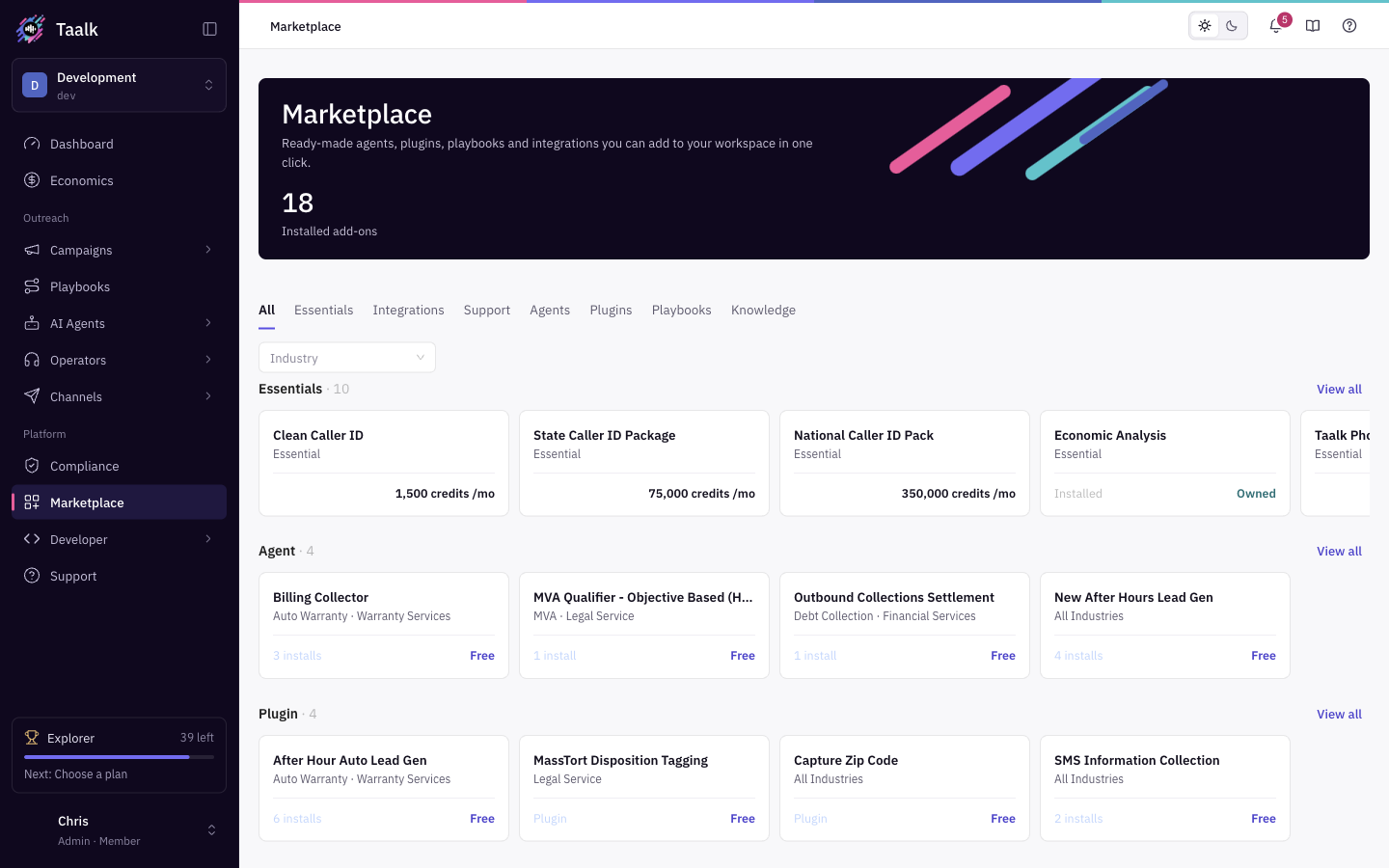 The tabs at the top filter what you see:
| Tab | What it shows |
|---|---|
| All | A sample of every row: Essentials, then featured agents, plugins, playbooks and knowledge, then Integrations and Support |
| Essentials | Add-ons in the Caller ID, Advance Features and Voice groups |
| Integrations | API Access, Connected Services and Custom Telcom Services |
| Support | Support Service (Dedicated AISC Support) |
| Agents, Plugins, Playbooks, Knowledge | Templates you can install. See Install Templates from the Marketplace |
The banner counts your Installed add-ons. Each card shows its price, or Owned once you have it. Click View all on a row to open that tab.
Buy an add-on
- Click the add-on card. Its detail page opens with a description of the add-on.
- Click the price button (for example $25.00 /mo, or $10.00 for a one-time add-on).
- In Confirm Purchase, check the price and billing type (Billed monthly or One-time purchase). Monthly add-ons say "You will be charged monthly until this add-on is canceled." Purchases are non-refundable.
- Tick I agree to the Terms of Service and Privacy Policy and click Confirm Purchase.
- Taalk processes the payment and unlocks the add-on. Its button changes to Purchased, or Configure for integrations.
Prices are in US dollars and are charged to your balance. See How Billing Works.
| You see | Why | What to do |
|---|---|---|
| The Go live dialog | Your workspace is still the free sandbox | Add a card and go live on Starter. See Is There a Free Trial? |
| Subscription is Required | The workspace has no self-serve plan | Click Show me the plans |
| Company Info Required | Your business details are missing | Complete them, then try again |
| Cannot complete the purchase | The payment failed or something else went wrong | Submit a ticket under Platform › Support |
What's in each group
Essentials
| Add-on | Price | Where it shows up once unlocked |
|---|---|---|
| Clean Caller ID | $1.50 /mo per number | Outreach › Channels › Phone numbers. Buy it from there with + New, not from the Marketplace card. See Phone Numbers |
| State Caller ID Package | $75.00 /mo | 50 numbers, one per state, on Phone numbers |
| National Caller ID Pack | $350.00 /mo | 280 local area codes, on Phone numbers |
| Economic Analysis | $150.00 /mo | Economics in the sidebar. See Campaign Economics |
| Taalk Phone | $75.00 /mo per seat | The full Operators menu. See Taalk Phone for Admins 1 |
| Post-Call Analysis | $25.00 /mo | Custom post-call questions and the Magic Lens. Standard dispositions are free. See Post-Call Analysis |
| AI Listener | $25.00 /mo | Listens to every Taalk Phone call for Co-Pilot and listening in. Operators › Settings › Call handling |
| AI Operator | $25.00 /mo | An AI Agent answers Taalk Phone calls when no one is free. Operators › Settings, AI tab. See Taalk Phone for Admins 4 |
| Taalk AI Builder | Free | Draft my agent in the agent wizard and Create with AI for playbooks. See Taalk AI Builder |
| Custom Voices (Voice group) | $5.00 /mo | Company Detail › Custom Voices. See Voice and Persona |
Clean Caller ID, the caller ID packs and Taalk Phone can be bought more than once (one per number, pack or seat).
[Confirm] How State and National pack numbers are delivered to the workspace (added automatically or set up by Taalk).
Integrations
| Add-on | Group | Price |
|---|---|---|
| Taalk API Token | API Access | Free |
| Embedded iFrame | API Access | $10.00 one-time |
| Salesforce | Connected Services | $10.00 one-time |
| Google Suite | Connected Services | $10.00 one-time |
| Calendly | Connected Services | $10.00 one-time |
| Twilio | Custom Telcom Services | $10.00 one-time |
After you buy one, click Configure to open it under Developer › Integrations. See Integrations Overview.
Integration add-ons are a one-time purchase.
Support
| Add-on | Price |
|---|---|
| Dedicated AISC Support | 10% of your monthly spending. The button reads Contact Sales; our team sets it up with you |
See what you're paying for
Your active add-ons appear as tags on the Current Plan card under Account menu › Subscription, with the monthly add-on fee. See Billing and Subscriptions.
Cancel an add-on
There is no cancel button for add-ons in the console. Submit a ticket under Platform › Support with Issue Type set to Billing Issue.
[Confirm] C16: the self-serve cancel path, and when billing stops.
When an add-on is canceled, the feature is hidden or switched off, but its settings stay in your workspace. If you buy it again, everything comes back as it was.
Locked features
A locked feature shows a lock and a button that opens its add-on page. Settings for a locked add-on are hidden or greyed out until you buy it (for example Custom Voices and AI Analysis Agent in Company Detail).