You can either use Taalk Telco directly or Bring Your Own Twilio (BYOT) — keeping your Twilio account, Caller IDs, and 10DLC registrations intact while Taalk handles all AI logic, routing, engagement tracking, and analytics.
Where to Set Up BYOT (Developer Hub → Integration)
You can connect your Twilio account inside:
Developer Hub → Integrations → Twilio
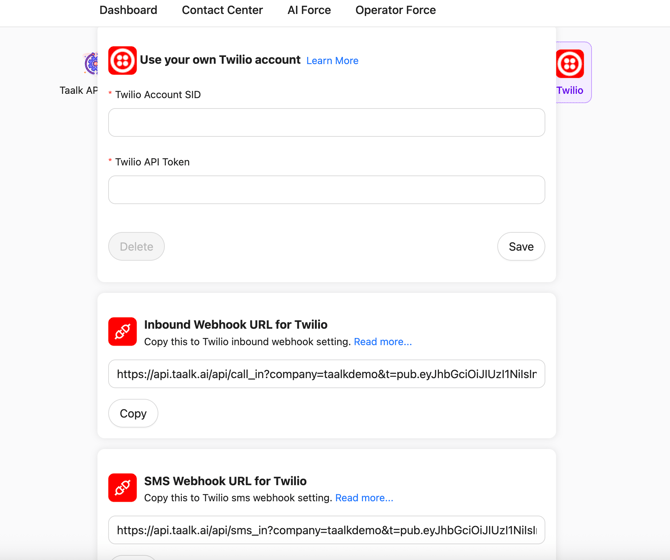
In this section you will:
-
Enter your Twilio Account SID
-
Enter your Twilio Auth Token
-
Save the integration
-
Copy the Inbound Webhook URL
-
Copy the SMS Webhook URL
After saving, Taalk generates two callback URLs that must be pasted into your Twilio Webhook settings.
This step is required for calls and SMS to reach Taalk.
Twilio sends all inbound events to these URLs, and Taalk processes your AI workflows.
Important:
Make sure you copy the webhook URLs into your Twilio number settings under:
-
Voice → A Call Comes In → Webhook
-
Messaging → A Message Comes In → Webhook
Once added, Twilio will send every inbound call/SMS into Taalk’s AI router.
Summary
BYOT allows you to continue using your Twilio environment while letting Taalk act as the AI orchestration layer above it.
You keep:
-
Your numbers
-
Your 10DLC registrations
-
Your Caller IDs
-
Twilio billing and controls
Taalk provides:
-
AI logic
-
Engagement orchestration
-
Real-time analytics
-
Call/SMS processing
-
Compliance tracking
Overview: The Two Integration Paths
You can integrate with Taalk in two ways:
1. Porting
You move number ownership to Taalk’s carrier SID.
2. BYOT (Bring Your Own Twilio)
You keep your Twilio setup fully intact, and Taalk “borrows” your telco for calls and messages.
Most teams choose BYOT because it’s fast, preserves all your existing registrations, and requires zero rework.
Porting vs. BYOT Comparison
|
Feature |
Porting |
BYOT |
|---|---|---|
|
Ownership |
Moves to Taalk |
You retain it |
|
Billing |
Managed by Taalk |
You pay Twilio directly |
|
10DLC / Brand Registration |
Must re-register |
Stays active |
|
Caller ID |
Reassigned |
Works as-is |
|
Setup Time |
Slower |
Instant |
|
Control |
Taalk-managed |
Shared |
|
Engagement Fees |
Same |
Same |
|
Taalk CleanID Cost |
Same |
Same |
How BYOT Works
Once you enter your SID + Auth Token, Taalk uses your Twilio environment for:
-
Outbound calling & SMS
-
AI Logic (Playbooks, Agents, Journeys)
-
Routing & campaign orchestration
-
Real-time engagement tracking
-
Compliance logic
-
Data analytics
You continue managing your Twilio:
-
Caller IDs
-
Number purchases
-
A2P Brand & Campaigns
-
Number pools
-
Billing
Taalk handles everything above the telco layer.
📊 Reporting & Analytics
Taalk tracks all AI engagement events, including:
-
Voicemails
-
Busies
-
Tri-tone detection
-
No Answer
-
Transfer completions
-
DNC requests
-
Full/partial surveys
If you want deeper visibility, you can append Twilio’s raw CDR analytics to Taalk dashboards.
☎ Caller ID, Spam Likely & Number “Cleaning”
Caller ID continues working normally from Twilio.
If a number shows Spam Likely, Taalk can perform “cleaning,” which includes:
-
CNAM re-registration
-
Trust profile updates
-
Warm-up cycles
-
Carrier spam removal (paid)
Clean numbers get better connection rates and restore Caller ID trust.
📦 Porting Explained
Porting moves the number 100% into Taalk’s carrier environment.
When ported:
-
Taalk becomes the official owner
-
Twilio billing disappears
-
10DLC must be re-registered
-
Numbers show natively in Taalk Telco
You should port only if you want all telco centralized with Taalk.
⚙ FAQs
Can we manage our numbers through Twilio?
Yes. In BYOT mode, you fully manage your Twilio numbers, campaigns, and Caller IDs.
Will Caller IDs still show correctly?
Yes — Caller ID remains exactly as configured in Twilio.
If a number is flagged as spam, Taalk can help clean it.
Do we lose our 10DLC or Voice Identity registrations?
No — they remain active under your Twilio account.
Can we access Twilio analytics?
Absolutely. You can blend Twilio logs with Taalk’s AI engagement reports.
Is pricing different when using BYOT?
No — engagement fees are identical.
Important Notes
-
Taalk does not open external APIs for BYOT — everything runs through Taalk’s engagement engine.
-
Engagement fees remain the same across porting and BYOT.
-
You can connect a Twilio master account to manage multiple child environments.
-
10DLC remains on your Twilio brand unless you port numbers into Taalk.
Quick Decision Guide
Choose BYOT if:
-
You want to retain Twilio ownership and billing
-
You want zero re-registration
-
You need fastest setup
-
You don’t mind maintaining the Twilio billing (dual cost)
Choose Porting if:
-
You want Taalk to manage full telco, CNAM, billing
-
You want compliance fully centralized
-
You operate multiple brands under one umbrella
💬 Need Help?
Contact your Taalk Solutions Consultant or email success@taalk.ai for:
-
BYOT setup help
-
Number cleaning
-
Porting assistance
-
Twilio troubleshooting